

Description
Download RPM Remote Print Manager Elite 32 Bit – Secure Print Management for Windows
RPM Remote Print Manager Elite 32 Bit is a powerful, professional-grade print management tool designed for businesses and IT administrators running on Windows systems. Developed by Brooks Internet Software, Inc., this software offers a comprehensive solution for capturing, processing, and routing print jobs from multiple sources—including network printers, email, web applications, and legacy systems. With support for Windows Vista and later, RPM Remote Print Manager Elite 32 Bit ensures compatibility with a wide range of enterprise environments. The latest version, 6.2.0.561, includes enhanced security features, improved PDF conversion, and better job filtering capabilities. Whether you're managing high-volume print operations or enforcing secure print release policies, this software delivers reliability, scalability, and ease of use. Available as a free trial, it allows users to test all premium features before purchasing. With support for English, German, and French, it's accessible to a global audience. Ideal for organizations seeking to reduce paper waste, improve print efficiency, and maintain strict document control, RPM Remote Print Manager Elite is a must-have tool for modern print infrastructure.
Key Features of RPM Remote Print Manager Elite 32 Bit
One of the standout aspects of RPM Remote Print Manager Elite 32 Bit is its robust feature set, tailored specifically for enterprise-level print environments. The software excels at capturing print jobs from virtually any source—whether it’s a network printer, a web application, an email attachment, or a legacy system. This versatility makes it an ideal solution for organizations with complex, multi-platform printing needs. A core feature is its advanced PDF conversion engine, which transforms print output into searchable, compressed PDF files with customizable settings, including encryption and metadata embedding. This is especially valuable for compliance and archiving purposes.
Another major advantage is its intelligent print job filtering and routing. Administrators can set up rules based on user, printer, document type, or even content keywords, enabling automatic sorting and distribution of print jobs. For example, HR documents can be routed to a secure printer, while marketing materials go to a high-speed color printer. The software also supports secure printing with pull printing (also known as release printing), where users must authenticate at a printer before their job is released—great for reducing lost or misplaced documents.
Additionally, RPM Remote Print Manager Elite includes support for virtual printers, allowing users to generate print jobs from applications that don’t have direct printing capabilities. It also integrates with email systems, enabling automatic processing of print jobs sent via email attachments. With built-in logging and reporting tools, IT teams gain full visibility into print activity, helping identify inefficiencies and unauthorized usage. These features, combined with a user-friendly interface, make RPM Remote Print Manager Elite a top choice for businesses serious about optimizing their print workflows.
Installation & Usage Guide for Windows Users
Installing RPM Remote Print Manager Elite 32 Bit on Windows is straightforward and well-documented. Begin by visiting the official website of Brooks Internet Software, Inc., where you can download the free trial version. The installer is lightweight and runs smoothly on Windows Vista, 7, 8, 10, and 11. Once downloaded, simply run the setup file and follow the on-screen prompts. The installation process is quick, typically taking less than five minutes, and does not require administrative privileges for basic use, though full functionality may need elevated access.
After installation, launch the application and go through the initial setup wizard. You’ll be prompted to configure your print capture methods—such as setting up virtual printers or monitoring specific network ports. The software automatically detects existing printers and allows you to assign them to specific print queues. You can then define processing rules, such as converting all jobs to PDF, adding watermarks, or sending files to a shared network folder.
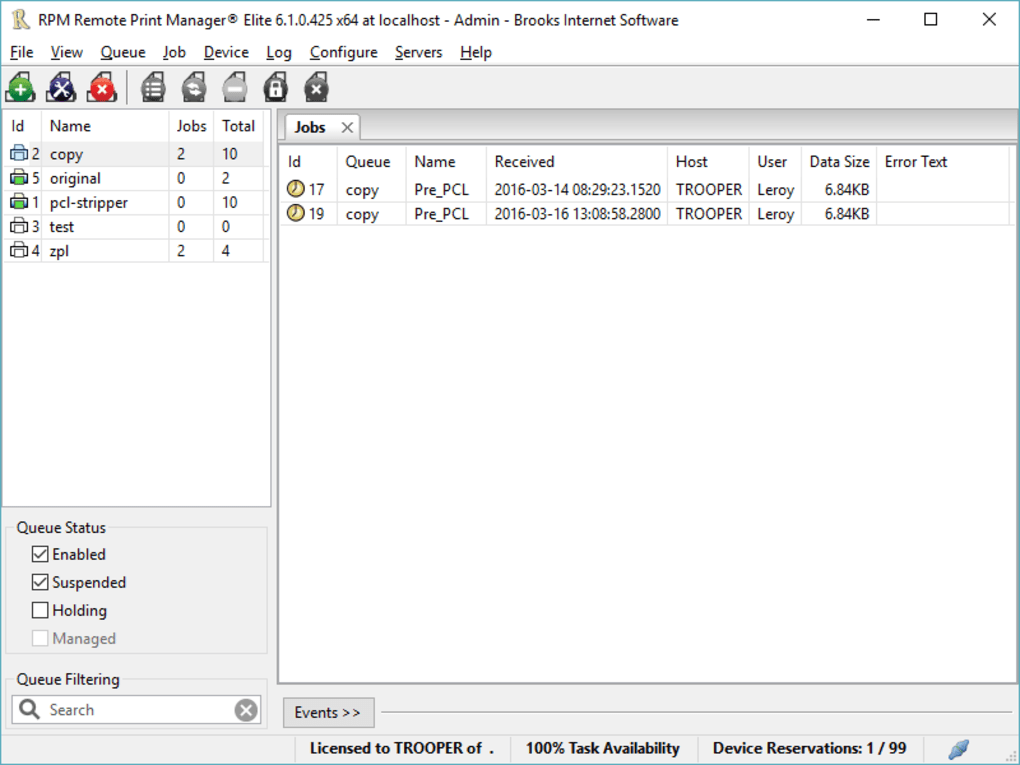
For daily use, the intuitive dashboard provides real-time monitoring of print jobs, including status, source, and processing time. Users can manually release print jobs from the secure queue, and administrators can schedule automated tasks like nightly PDF archiving or report generation. The software also supports command-line execution, making it ideal for integration into scripts and batch processes. Regular updates are released to improve stability, security, and feature performance—ensuring your print management system stays current and secure. With comprehensive documentation and a responsive support team, even first-time users can get up and running quickly.
Compatibility & System Requirements
RPM Remote Print Manager Elite 32 Bit is specifically designed for Windows operating systems, with full compatibility across Windows Vista and all subsequent versions, including Windows 10 and Windows 11. This broad support makes it suitable for both legacy environments and modern enterprise networks. The software is optimized for 32-bit systems, ensuring stable performance on older hardware without sacrificing functionality.
System requirements are modest, making it accessible even on older or budget-friendly machines. A minimum of 1 GB RAM and 500 MB of free disk space are recommended, though 2 GB RAM and 1 GB of storage are advised for optimal performance with high-volume printing. The software runs efficiently in the background without consuming excessive CPU or memory resources, which is crucial for servers and shared workstations.
While the software is currently available only for Windows, its capabilities extend beyond the local machine. It can manage print jobs from remote users, web applications, and email clients, making it ideal for distributed teams. The 32-bit version is particularly useful for organizations still running older hardware or software that doesn’t support 64-bit applications. With support for multiple languages—English, German, and French—it caters to international businesses. Whether you're managing a single office printer or a multi-location print infrastructure, RPM Remote Print Manager Elite 32 Bit delivers reliable performance and seamless integration with existing workflows.
Pros and Cons: Is RPM Remote Print Manager Elite Right for You?
- Pros:
- Powerful print job capture from multiple sources (email, web, network)
- Advanced PDF conversion with encryption and metadata support
- Secure pull printing to prevent document loss
- Intelligent job filtering and automated routing
- Lightweight, stable performance on 32-bit Windows systems
- Comprehensive logging and reporting tools
- Free trial available with full feature access
- Excellent customer support and detailed documentation
- Cons:
- Only available for Windows (no Mac, iOS, or Android versions)
- 32-bit only—may not suit modern 64-bit systems
- Advanced features require some technical knowledge to configure
- Limited mobile integration (no dedicated app for smartphones)
- Full version requires a paid license after the trial
Frequently Asked Questions (FAQ)
Can I use RPM Remote Print Manager Elite on Windows 11?
Yes, RPM Remote Print Manager Elite 32 Bit is fully compatible with Windows 11. The software has been tested and optimized for the latest Windows versions, including Windows 10 and 11, ensuring stable performance and full feature support.
Is there a free version of RPM Remote Print Manager Elite?
Yes, a free trial version is available that includes all premium features. This allows users to test the software’s full functionality before purchasing a license, making it easy to evaluate whether it meets your organization’s print management needs.
Can I convert print jobs to PDF automatically?
Absolutely. RPM Remote Print Manager Elite includes a built-in PDF conversion engine that can automatically convert print jobs into PDF format. You can customize settings such as compression, encryption, and metadata inclusion for enhanced security and compliance.
Does it support secure printing (pull printing)?
Yes, secure printing is one of the core features. Users can send print jobs to a secure queue and release them only after authenticating at the printer, reducing the risk of sensitive documents being left unattended.
Can I use this software on older Windows systems like Windows 7?
Yes, RPM Remote Print Manager Elite 32 Bit supports Windows Vista and above, including Windows 7, 8, 10, and 11. This makes it ideal for organizations still running legacy systems or needing long-term software stability.
Conclusion: Why Choose RPM Remote Print Manager Elite 32 Bit?
If you're an IT administrator or business owner looking to modernize your print infrastructure, RPM Remote Print Manager Elite 32 Bit is a powerful, reliable solution. Its ability to capture, process, and route print jobs from any source—combined with secure printing, PDF conversion, and intelligent filtering—makes it a standout in the print management space. While it’s limited to Windows and 32-bit systems, its stability, feature depth, and free trial make it a smart investment for organizations of all sizes.
Whether you’re reducing paper waste, improving document security, or streamlining workflows, this software delivers real value. With regular updates and strong support, you can trust RPM Remote Print Manager Elite to keep your print operations running smoothly. Download the free trial today and experience the future of print management on Windows.
Guides & Tutorials for RPM Remote Print Manager Elite 32 Bit
How to install RPM Remote Print Manager Elite 32 Bit
- Click the Preview / Download button above.
- Once redirected, accept the terms and click Install.
- Wait for the RPM Remote Print Manager Elite 32 Bit download to finish on your device.
How to use RPM Remote Print Manager Elite 32 Bit
This software is primarily used for its core features described above. Open the app after installation to explore its capabilities.
User Reviews for RPM Remote Print Manager Elite 32 Bit 0
No reviews found





